> ## Documentation Index
> Fetch the complete documentation index at: https://docs.vartiq.com/llms.txt
> Use this file to discover all available pages before exploring further.
# Quickstart
> Start sending webhooks in under 5 minutes
## Concepts
Vartiq has three main concepts:
* **Apps** represents your customer. Create one app per customer.
* **Webhooks** are the URLs that receive the webhooks. Each app can have multiple webhooks.
* Webhooks can be created without an app as well. Which we call global webhooks.
* **Messages** are the data that is sent to the webhooks.
## Install the SDK
```javascript JavaScript theme={null}
npm i vartiq
// or
bun add vartiq
// or
pnpm add vartiq
```
{/* ```php PHP
composer require vartiq/vartiq
``` */}
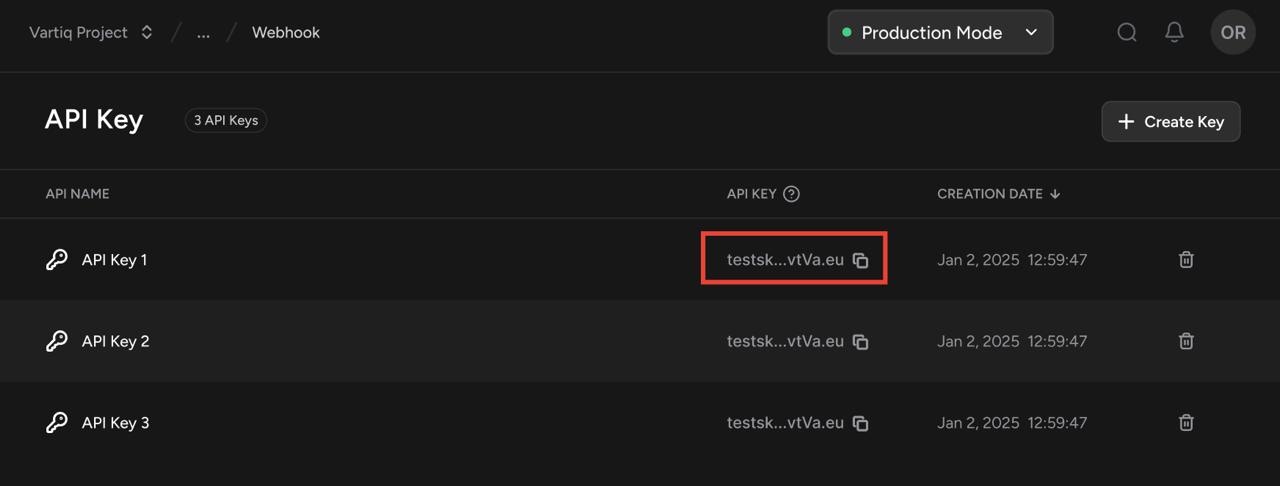
## Get the API Key
Get the API key from the Vartiq [dashboard](https://dashboard.vartiq.com/api-keys).
 ## Get the project ID
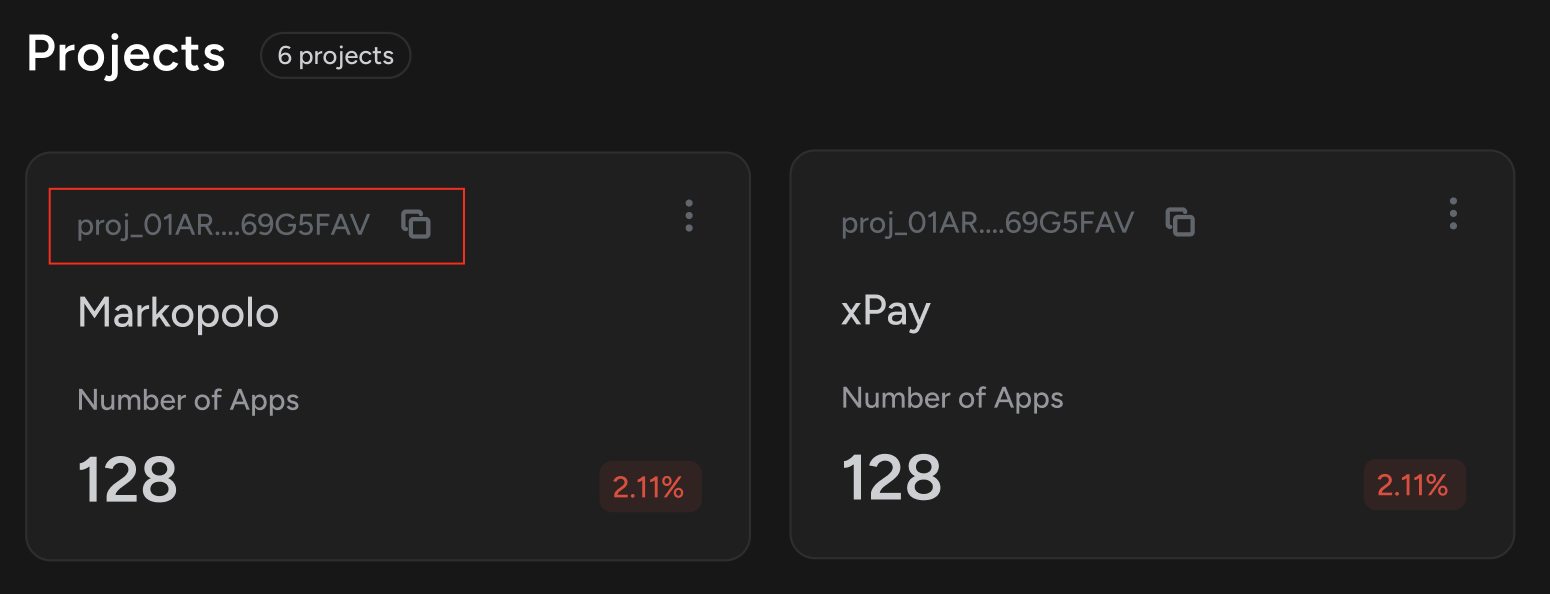
You can have multiple projects in your account. Get the project ID from the project settings
## Get the project ID
You can have multiple projects in your account. Get the project ID from the project settings
 ## Initialize the SDK
```javascript JavaScript theme={null}
import { Vartiq } from 'vartiq';
const vartiq = new Vartiq("YOUR_API_KEY");
```
// \`\`\`php PHP
// use Vartiq\Vartiq;
// \$vartiq = new Vartiq("YOUR\_API\_KEY");
// \`\`\`
## Creating an App
```javascript JavaScript theme={null}
const app = await vartiq.app.create({
name: "App name", // setting this to the name or id of your customer is recommended
projectId: "PROJECT_ID",
});
```
{/* ```php PHP
$app = $vartiq->app->create([
"name" => "App name", // setting this to the name or id of your customer is recommended
"project_id" => "PROJECT_ID",
]);
``` */}
```bash cURL theme={null}
curl -X POST https://api.us.vartiq.com/apps \
-H "X-API-KEY: YOUR_API_KEY" \
-H "Content-Type: application/json" \
-d '{"name": "App name", "project_id": "PROJECT_ID"}'
```
## Creating a webhook within an app
```javascript JavaScript theme={null}
const webhook = await vartiq.webhook.create({
url: "https://example.com",
appId: "APP_ID",
customHeaders: [{ key: "x-key", value: "x-value" }], // optional
});
```
{/* ```php PHP
$webhook = $vartiq->webhook->create([
'name' => 'Webhook',
'url' => 'https://your-webhook-url.com',
'appId' => 'APP_ID',
'customHeaders' => [['key' => 'x-app', 'value' => 'x-value']] // optional
]);
``` */}
```bash cURL theme={null}
curl -X POST https://api.us.vartiq.com/webhooks \
-H "X-API-KEY: YOUR_API_KEY" \
-H "Content-Type: application/json" \
-d '{"url": "https://your-webhook-url.com", "app_id": "APP_ID", "custom_headers": [{"key": "x-app", "value": "x-value"}]}'
```
## Creating a webhook without an app
```javascript JavaScript theme={null}
const webhook = await vartiq.webhook.create({
projectId: "PROJECT_ID",
environmentId: "ENVIRONMENT_ID",
url: "https://example.com",
customHeaders: [{ key: "x-key", value: "x-value" }], // optional
});
```
```bash cURL theme={null}
curl -X POST https://api.us.vartiq.com/webhooks \
-H "X-API-KEY: YOUR_API_KEY" \
-H "Content-Type: application/json" \
-d '{"project_id": "PROJECT_ID", "environment_id": "ENVIRONMENT_ID", "url": "https://your-webhook-url.com", "custom_headers": [{"key": "x-key", "value": "x-value"}]}'
```
## Sending a Message
Sending a message to a app(your customer) will send the message to all the webhooks associated with the app.
```javascript JavaScript theme={null}
const message = await vartiq.webhook.message.create({ appId: "APP_ID"}, {
hello: "world"
});
```
{/* ```php PHP
$message = $vartiq->webhook->message->create("APP_ID", [
'hello' => 'world'
]);
``` */}
```bash cURL theme={null}
curl -X POST https://api.us.vartiq.com/webhook-messages \
-H "X-API-KEY: YOUR_API_KEY" \
-H "Content-Type: application/json" \
-d '{"app_id": "APP_ID", "payload": {"hello": "world"}}'
```
Schedule a quick call with our team to get personalized support, feature walkthroughs, or technical guidance.
## Initialize the SDK
```javascript JavaScript theme={null}
import { Vartiq } from 'vartiq';
const vartiq = new Vartiq("YOUR_API_KEY");
```
// \`\`\`php PHP
// use Vartiq\Vartiq;
// \$vartiq = new Vartiq("YOUR\_API\_KEY");
// \`\`\`
## Creating an App
```javascript JavaScript theme={null}
const app = await vartiq.app.create({
name: "App name", // setting this to the name or id of your customer is recommended
projectId: "PROJECT_ID",
});
```
{/* ```php PHP
$app = $vartiq->app->create([
"name" => "App name", // setting this to the name or id of your customer is recommended
"project_id" => "PROJECT_ID",
]);
``` */}
```bash cURL theme={null}
curl -X POST https://api.us.vartiq.com/apps \
-H "X-API-KEY: YOUR_API_KEY" \
-H "Content-Type: application/json" \
-d '{"name": "App name", "project_id": "PROJECT_ID"}'
```
## Creating a webhook within an app
```javascript JavaScript theme={null}
const webhook = await vartiq.webhook.create({
url: "https://example.com",
appId: "APP_ID",
customHeaders: [{ key: "x-key", value: "x-value" }], // optional
});
```
{/* ```php PHP
$webhook = $vartiq->webhook->create([
'name' => 'Webhook',
'url' => 'https://your-webhook-url.com',
'appId' => 'APP_ID',
'customHeaders' => [['key' => 'x-app', 'value' => 'x-value']] // optional
]);
``` */}
```bash cURL theme={null}
curl -X POST https://api.us.vartiq.com/webhooks \
-H "X-API-KEY: YOUR_API_KEY" \
-H "Content-Type: application/json" \
-d '{"url": "https://your-webhook-url.com", "app_id": "APP_ID", "custom_headers": [{"key": "x-app", "value": "x-value"}]}'
```
## Creating a webhook without an app
```javascript JavaScript theme={null}
const webhook = await vartiq.webhook.create({
projectId: "PROJECT_ID",
environmentId: "ENVIRONMENT_ID",
url: "https://example.com",
customHeaders: [{ key: "x-key", value: "x-value" }], // optional
});
```
```bash cURL theme={null}
curl -X POST https://api.us.vartiq.com/webhooks \
-H "X-API-KEY: YOUR_API_KEY" \
-H "Content-Type: application/json" \
-d '{"project_id": "PROJECT_ID", "environment_id": "ENVIRONMENT_ID", "url": "https://your-webhook-url.com", "custom_headers": [{"key": "x-key", "value": "x-value"}]}'
```
## Sending a Message
Sending a message to a app(your customer) will send the message to all the webhooks associated with the app.
```javascript JavaScript theme={null}
const message = await vartiq.webhook.message.create({ appId: "APP_ID"}, {
hello: "world"
});
```
{/* ```php PHP
$message = $vartiq->webhook->message->create("APP_ID", [
'hello' => 'world'
]);
``` */}
```bash cURL theme={null}
curl -X POST https://api.us.vartiq.com/webhook-messages \
-H "X-API-KEY: YOUR_API_KEY" \
-H "Content-Type: application/json" \
-d '{"app_id": "APP_ID", "payload": {"hello": "world"}}'
```
Schedule a quick call with our team to get personalized support, feature walkthroughs, or technical guidance.